SNMP Engine Integration Details
SNMP Engine Integration — Configurable Settings
Simple Network Management Protocol (SNMP) integration is essential for connecting SNMP-enabled devices (routers, switches, firewalls, servers, UPS systems) to the Selector platform for comprehensive network visibility.
SNMP is a widely adopted protocol crucial for standardized operational data collection in modern enterprise networks with thousands of diverse devices, ensuring performance, reliability, and continuous visibility.
SNMP integration for the Selector platform enables customers to:
- Monitor device availability and health.
- Track interface statistics and bandwidth usage.
- Detect threshold breaches and system faults.
- Collect key metrics like CPU, memory, temperature, and power consumption.
- Generate timely alerts for abnormal behavior or failures.
- Visualize operational trends through custom reports and dashboards.
- Enhance root cause analysis and troubleshooting efforts.
This document describes every setting exposed in the SNMP Engine Integration UI from Selector portal.
The main SNMP engine integration setup UI looks like this:
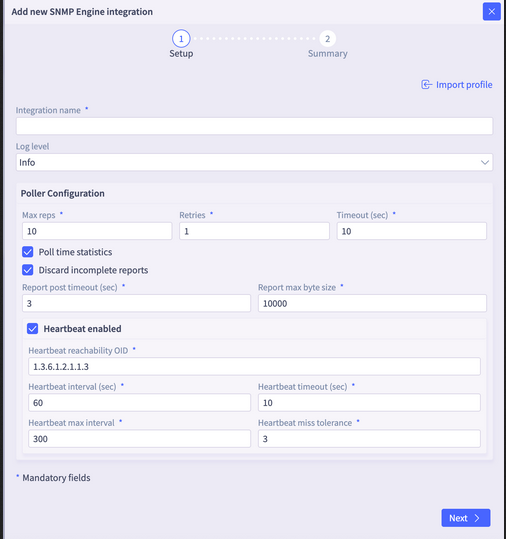
There is also a summary window that appears once the UI fields are completed.
Settings Reference
Top-level
| Field Name | Default Values | Description |
|---|---|---|
| Integration name | | Identifies the integration document in etcd. The engine reads the document whose key suffix matches its own class value; falls back to __global__ as a default. |
| Log level | info | Sets the engine logger verbosity. Accepted values: debug, info, warn, error. The special value restart triggers a graceful engine shutdown/restart. Any change to this field causes pollers to restart so the new log level takes effect. |
Poller Configuration
All fields below live under config.poller in the API.
| Field Name | Default Values | Description |
|---|---|---|
| Max reps | 10 | Maximum number of repetitions per SNMP GETBULK PDU (gosnmp.SetMaxRepetitions). Applied to both the main poll client and the heartbeat client. Higher values fetch more OIDs per round-trip but increase per-PDU size. |
| Retries | 1 | Number of retries on the main poll SNMP client (gosnmp.SetRetries). The heartbeat client always uses 0 retries regardless of this setting. |
| Timeout (sec) | 10 | Per-request timeout for the main SNMP walk client. Can be overridden per device via the inventory tag poll_timeout_in_sec. Does not apply to the heartbeat client (see Heartbeat timeout). |
| Poll time statistics | true | When enabled, the engine records per-device and per-group poll timing as Prometheus time-series (PollTime, GroupPollStartTime). These series are deleted when a poller is stopped. |
| Discard incomplete reports | false | When enabled, any OID group that experiences a bulk-walk error or returns empty PDUs is dropped entirely rather than forwarded with partial data. Groups that have any per-OID failures are also discarded as a whole. |
| Report post timeout (sec) | 35 | HTTP client timeout when posting collected data to the collection endpoint (http://s2-collection:…). Applies to the non-Kafka (HTTP POST) reporting path only. |
| Report max byte size | 900000 | Maximum byte size of a single report chunk. The engine splits JSON-marshalled report objects into chunks that do not exceed this size before sending them downstream (Kafka or HTTP). |
Heartbeat Configuration
The heartbeat is a lightweight background goroutine that periodically polls a single reachability OID per device. Its results gate whether the main data poll runs, and feed device reachability metrics.
| Field Name | Default Values | Description |
|---|---|---|
| Heartbeat enabled | true | Master switch for the heartbeat goroutine. When disabled, no reachability checks are performed and the main data poll always runs unconditionally. |
| Heartbeat reachability OID | 1.3.6.1.2.1.1.3 | OID used for the synthetic "heartbeat" label group walk. Also used during multi-community probing on both the main and heartbeat clients to determine the correct community string for a device. |
| Heartbeat interval (sec) | 60 | Base interval between heartbeat polls. After each successive miss, the interval doubles (exponential backoff) up to the max interval. Resets to the base interval on a successful heartbeat. |
| Heartbeat timeout (sec) | 10 | Per-request timeout applied exclusively to the heartbeat SNMP client (gosnmp.SetTimeout). Independent of the main poll timeout. |
| Heartbeat max interval | 300 | Upper bound (in seconds) for the exponential backoff of the heartbeat interval. The ticker interval will not grow beyond this value regardless of how many consecutive misses occur. |
| Heartbeat miss tolerance | 3 | Number of consecutive heartbeat failures before the engine considers the device unreachable. Once exceeded, the main data poll is skipped for that device and HeartbeatStatus metrics are set to reflect the outage. |