Selector Role-Based Access Control
Overview
Selector supports a robust role-based access control (RBAC) model that allows for flexible and right-scoped permissions and resource access.
Selector supports three out-of-box default roles along with highly flexible custom roles. Users can be dynamically mapped to these roles based on required permissions.
In all contexts, System resources refer to users, roles, system settings, API keys, and more. Internal system resources refer to internal platform systems such as Kafka, MongoDB, and so on.
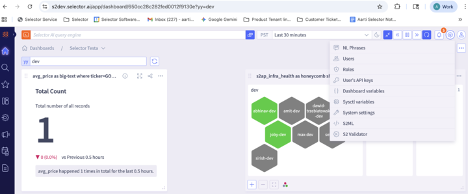
All roles can be inspected by navigating to the Roles information in the S2AP user interface settings, as shown below (Roles is the third item in the drop-down list on the right):
This document content is organized as follows:
- Out-of-box role: Admin
- Out-of-box role: Regular
- Out-of-box role: Read Only
- Custom Roles
- S2AP User-to-Role Mapping
- Summary
Out-of-Box Role: Admin
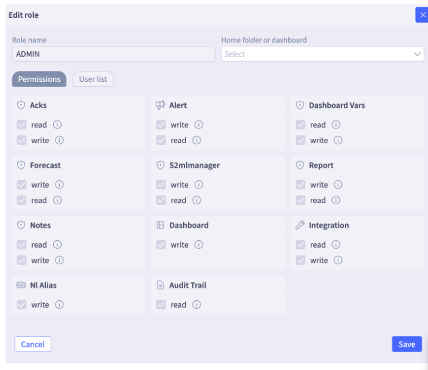
The Admin role provides Full permissions (Read, Write, Modify, Delete) access to everything.
- Full permissions across dashboards, widgets created by any user
- Full permissions for all integrations.
- Full permissions to all system resources (users, roles, system settings, and all API keys)
- Full Access to internal system resources like Kafka, MongoDB
The Admin role details can be viewed through the user interface:
Out-of-Box Role: Regular
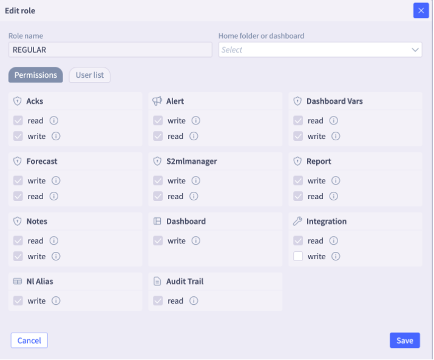
The Regular role provides a more restricted access.
- Full permissions for dashboards, widgets.
- Read permissions for Integrations.
- Full permissions for system resources created by that user only (example, API keys). No permissions to system resources of other users.
- No permissions to internal system resources.
The Regular role details can be viewed through the user interface:
Out-of-Box Role: Read Only
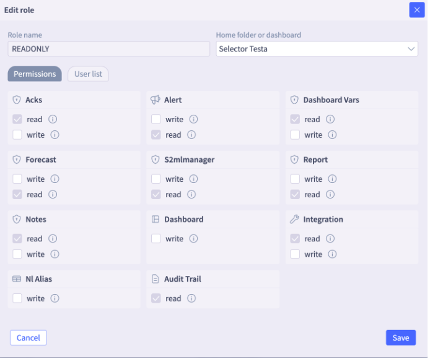
The Read Only role provides the most restricted access
- Read only permissions for all dashboards, widgets.
- Read Only permissions for Integrations.
- Read, Write, Modify, Delete access to their own system resources (ex. API keys). No permissions to system resources of other users.
- No access to internal system resources.
The Read Only role details can be viewed through the user interface:
Custom Roles
Selector also supports Custom Roles that allow assigning any flexible combination of permissions
- Flexible permissions (as configured) limited to the dashboards they are assigned to.
- Read, Write, Modify, Delete access to their own system resources (ex. API keys). No permissions to system resources of other users.
- No access to internal system resources.
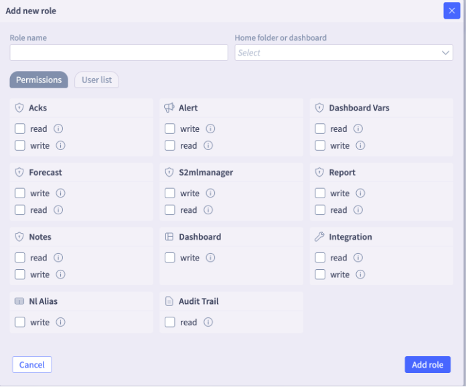
The Custom role details can be configured through the user interface:
S2AP User-to-Role Mapping
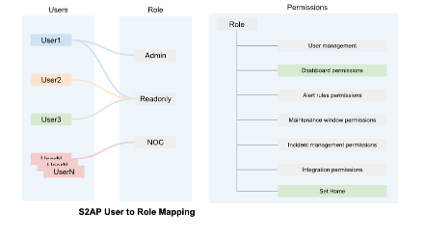
In the RBAC system, users are mapped to various roles, and the roles are linked to permissions to accomplish certain tasks, such as managing users or permissions for alert rules. There can be multiple users per role, and role permissions can be customized to fit the organization’s needs.
Selector Offers Comprehensive Security
In summary, the S2AP system offers a comprehensive and flexible role-based access model that allows Selector customers to adhere to secure, least-privilege principles to allow users to remotely access resources in their network. Key features include:
- API, UI support
- Integration with any generic OIDC IDP for Single Sign on (SSO)
- Dynamic SSO based role, attribute mapping
- Comprehensive audit trail for all S2AP interactions across users, resources and platform stacks