Selector Release Notes Version 3686 Oct 6 to Dec 15 2025
Categories:
Selector Release Notes for Version 3686
New Features and Enhancements
Slack Bot Usage Metrics
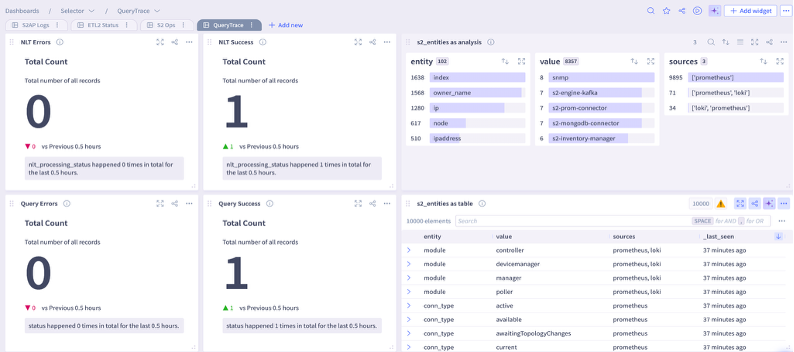
A new queryable fetches Natural Language queries and its usage metrics: s2_query_trace
You can find the user who executed the query, the s2ql query, the status, and the time it took to return the response.
For example, you can display the results of the s2_query_trace as a table:

Or you can display the s2_query_trace queryable in a dashboard (see lower right panel):
Disable or Remove Inactive Users
Identity Access Management (IAM) now monitors and disables or deletes users who have been inactive for a specified number of days.
You enable this setting by initiating a request to Selector Software or Customer Success representatives.
Configure Customised Thresholds Based on Vendor
Customers now have the ability to define custom thresholds for any fixed pipeline. This allows customers greater granularity to set thresholds for each vendor.
For example, you can configure separate thresholds for the CPU utilization metric for each vendor such as Cisco, Arista, Fortigate, and so on.
You configure this feature by initiating a request to Selector Software or Customer Success representatives.
Enhanced Dashboard Variables in NL Queries
Queries can use predefined variables, retrieve the default values, and use those values for query building. This feature integrates Dashboard variable resolution into the existing Natural Language Translation (NLT) query system.
For example, if the s2ql query is device_status as big-text where fqdn=~{{test-device-sw}} and the NL phrase is how is test-device-sw, the correct response is returned.
Sorting Capabilities in UDF Tables
Sorting is available for tables using a transform User-Defined Function (UDF) to allow a customer-preferred sorting order.
This feature enhances the current supported S2AP UI sorting by adding support for sorting of UDF tables
For example, the query name,aggregate.count:No_of_job_ids in automation_observability_state as table where hasParent =no group-by name order-by aggregate.count:desc in last 7 days produces the result sorted by the aggregate count in descending order.