Data Gap Improvements

Summary
Many data gaps (periods of unknown device reachability) seen in the current version (V1) of the Availability Report are not device outages. They are actually artifacts of “label churn”: a routine inventory update that changes a label, counts the availability time series restarts, and the records any missing coverage.
The new Availability Report (V2) design addresses these gaps in two ways. First, it narrows the availability identity to three fields (device name, device IP address, and site code), so inventory enrichment no longer breaks the series. Second, the new report also accurately reflects the reporting span for devices that are only partly in scope, so time before a device is added to the monitoring scope or after it is removed from it is no longer considered a gap.
Purpose Of This Document
This document has two goals:
- Explain the data gaps in the current Availability Report version (V1).
- Explain how the new Availability Report V2 design reduces those gaps.
Table of Contents
Why Data Gaps Occur in the Availability Report V1
How Reporting Time Is Measured
The Availability Report V2 Design
V1 vs V2 Column Mapping in the UI
What Is a Data Gap?
A data gap is a period inside the reporting window when the Selector software did not receive device reachability samples. During a data gap, the Selector platform cannot determine whether a device under monitoring is reachable or unreachable — coverage to determine that is simply missing.
A Data Gap Is NOT an Outage
The following table explains the differences between a true outage and a data gap.
| Event | Sample Status | What the Interval Means |
|---|---|---|
| Outage | Present | The device was measured and found unreachable. Downtime is real and attributable. |
| Data Gap | Absent | Reachability of devices during that interval is unknown. |
Why Data Gaps Occur in the Availability Report V1
The following table lists six operational causes that account for data gaps in the current (V1) design.
| Cause | What Happens to Create a Data Gap |
|---|---|
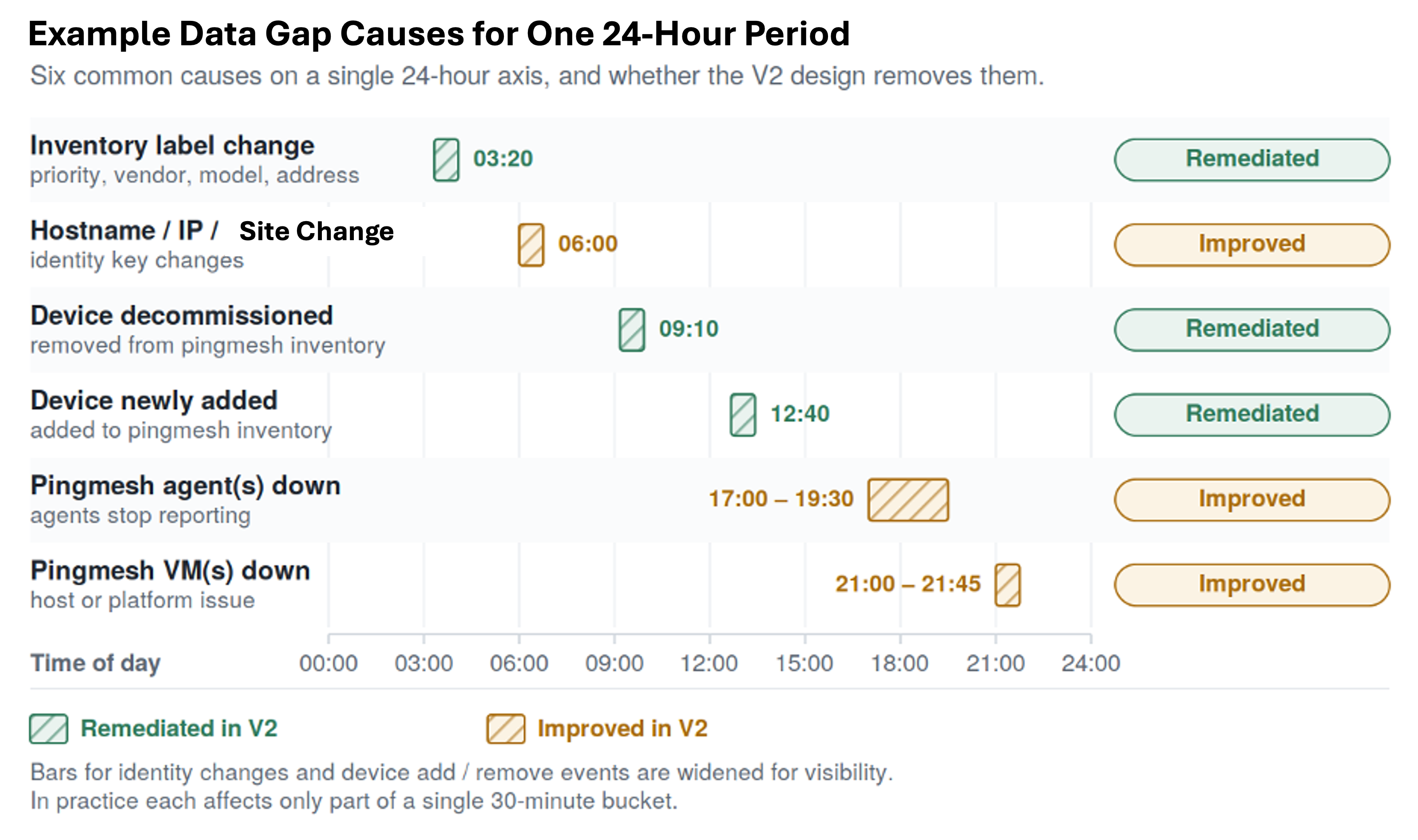
| Device Decommissioned | The device is removed from monitoring - removed from the device / pingmesh inventory - mid period. The remainder of the fixed reporting window is treated as a data gap. |
| Device Newly Added | The device starts being monitored mid-period: added to the device / pingmesh inventory. The time before coverage starts in the same reporting window is charged as a data gap. |
| Label / Identity Changes | Each availability series carries a large set of descriptive labels. When any of those labels change, the series can restart or split, and that transition is frequently recorded as a data gap. |
| Environmental Factors | Short network path or connectivity glitches between agents and devices. Maintenance or other change activity that may interrupt probing. (Environmental events are largely outside Selector application control.) |
| Pingmesh Agent(s) Down | If pingmesh agents probing devices stop reporting, corresponding devices show missing coverage—a data gap—until the agents recover. Some pingmesh agent issues could be caused by infrastructure issues outside of Selector control. |
| Pingmesh VM(s) Down | If virtual machine hosting pingmesh agents become unavailable due to host, power, or platform issues, coverage for corresponding devices drops. (Most VM availability issues are outside Selector control.) |
Data Gap Improvements
Selector is always trying to minimize the impact of or eliminate data gaps altogether. Here are some features of the Availability Report V2. The following figure shows whether the cause is eliminated (Remediated) or had its impact reduced (Improved) with the Availability Report V2.
Identity Changes Are the Largest Single Data Gap Cause
In the current V1 design, each monitored series carries many descriptive labels — inventory and classification attributes alike. Common identity-related changes include:
- Device name (hostname)
- Management IP address
- Site or other code
- Priority, product type, vendor, model, location fields, and similar inventory attributes
Because V1 attaches a large label set to the availability series, routine inventory updates are a frequent source of data gaps.
How Reporting Time Is Measured
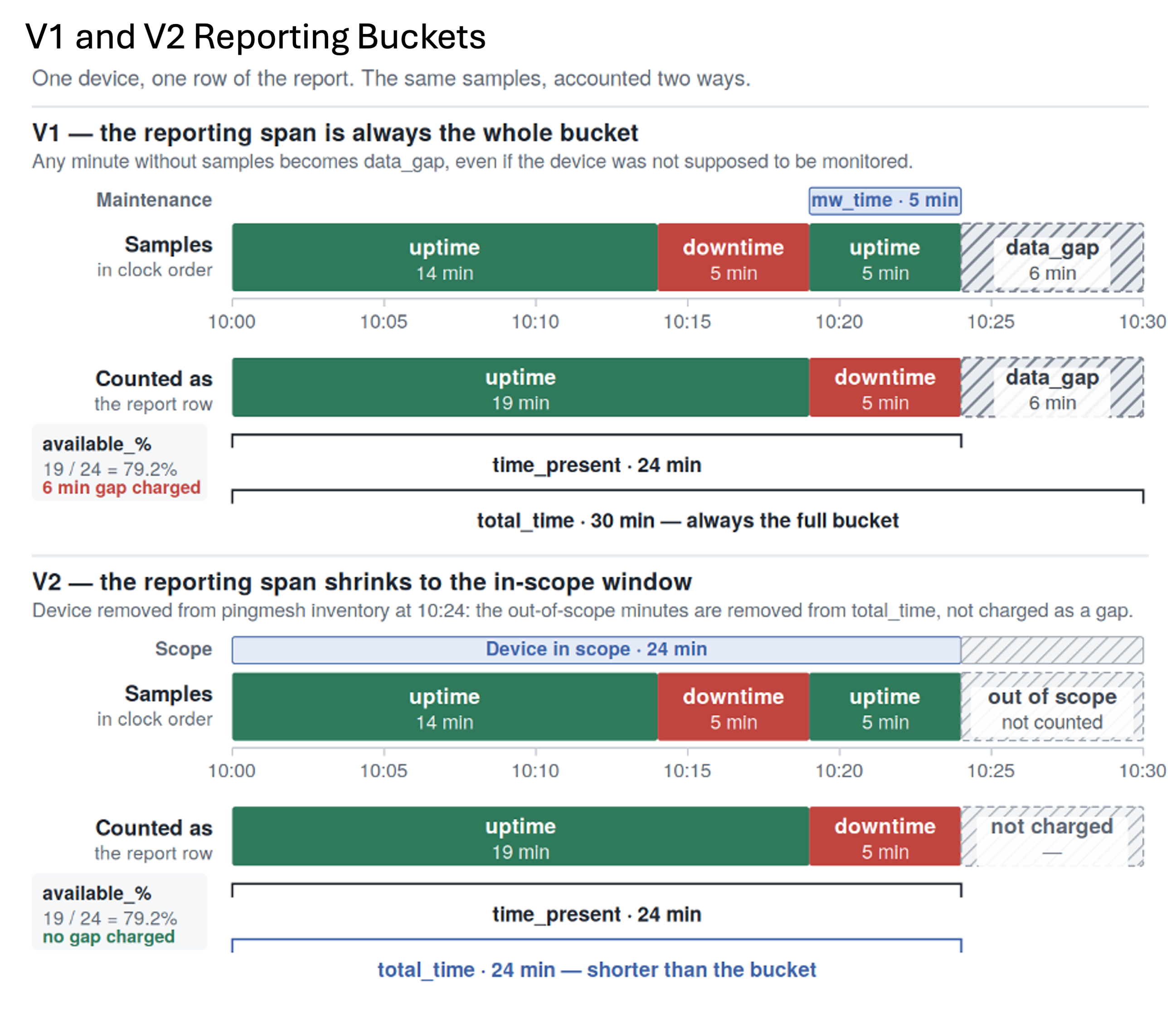
The Selector software follows a 30-minute cadence for reporting availability. Each row of the report covers one device for one 30-minute bucket, and every minute in that bucket resolves to one of four states, as shown in the following table.
| Field | The Minutes the Field Counts |
|---|---|
| uptime | Responses to probe present, so the device is reachable. |
| downtime | Responses to probe are not present, so the device is unreachable. |
| mw_time | The part of the bucket is overlapped by a declared maintenance window. |
| data_gap | No probe data, so reachability is unknown. |
Two time spans are derived from those states:
| Span | Definition |
|---|---|
| time_present | Sampled coverage — approximately uptime + downtime, after maintenance window handling. |
| total_time | The reporting span. In V1 this is always the full bucket. In V2 it can be shorter, when the device is only partly in scope. |
available_percentage = uptime / time_present × 100, when time_present > 0.
| In-scope window Only the portion of the bucket when the device is expected to be monitored. This is the term that lets V2 report a total_time shorter than 30 minutes. |
|---|
The following figure shows the relationship between these terms in V1 and V2.
The Availability Report V2 Design
The new device availability design is Availability Report V2. Relative to the current V1 design, V2 focuses on the following features:
- Fewer identity labels on the availability series.
- Clearer in-scope handling for devices that are added or removed mid-interval.
- Stronger separation of customer and operational views, including maintenance-aware ops columns.
- Cleaner outage accounting across buckets and month boundaries.
Identity Labels in V1 Compared to V2
In both designs, continuous reporting depends on a stable device identity. If identity labels change mid-interval, the series can break and appear as a data gap. The versions are compared in various areas in the following table.
| Area | Current V1 Design | V2 Design |
|---|---|---|
| Identity used for availability continuity | Broad set of labels: hostname, IP, site, plus many inventory and classification fields. | Narrow set: device name (hostname), device IP, site or other code. |
| Examples of extra V1 labels | Address, city, state, country, continent, coordinates, vendor, model, device type, physical type, priority, product type, custom tool, RU flag, in-scope flag, tags, and similar. | Not part of the V2 availability identity. |
| Effect of inventory-only updates (priority, product type, address, vendor) | Often restarts the series, producing a data gap. | Does not change V2 identity, so no gap arises from that label alone. |
| Effect of hostname / IP / Site or other code change | Can produce a data gap if the primary keys change. | When primary keys for a device change, this is treated as a new device, so it’s not really a data gap. |
Why This Matters for Data Gap
Most gaps in the current V1 design come from label churn: an inventory or classification field updates, the series identity changes, and the report records missing coverage. V2 reduces the label set to only the fields required to identify the device for availability, so that day-to-day inventory enrichment no longer breaks the series.
What V2 Remediates
The following table shows what data gap causes are mitigated in V2.
| Cause | Status in V2 | Outcome |
|---|---|---|
| Device decommissioned — removed from the device / pingmesh inventory | Remediated | Removal from inventory is what takes the device out of scope. Time after that point is not charged as a data gap; total_time can be less than 30 minutes. |
| Device newly added — added to the device / pingmesh inventory | Remediated | Addition to inventory is what brings the device into scope. Time before that point is not charged as a data gap; total_time can be less than 30 minutes. |
| Inventory / classification label changes — priority, product type, location, vendor, model and similar, but not hostname / IP / site | Remediated | These are no longer part of the V2 identity, so they no longer create series breaks. |
| Hostname / IP / site changes | Improved | Cleaner hand-off handling. Brief holes during an incomplete transition in primary key change can still appear as a data gap. (In any database, primary keys should not change for a good design.) |
What V2 Cannot Completely Eliminate, But Improves
V2 does not remove all data gaps. The following can still produce data gaps in V2, but the Selector software accounts for these data gaps in availability calculations.
| Category | Examples |
|---|---|
| Missing coverage due to environmental factors | Pingmesh VM(s) down Agents stop probing due to software upgrades, and high resource consumption (CPU, memory) that can result in the process being killed. Agent hand-offs during partial outages. |
V1 vs V2 Column Mapping in the UI
The reporting cadence for both V1 and V2 designs is typically 30 minutes per row, plus daily views.
Shared and Comparable Fields
The following table shows shared and comparable UI parameters for V1 and V2.
| UI Concept | V1 | V2 | Notes |
|---|---|---|---|
| Reachable time | uptime | uptime | In V2, planned maintenance time may be folded into customer uptime, so the percentage is not blank during a maintenance window. |
| Unreachable time | downtime | downtime | Samples present and device down. |
| Sampled coverage | time_present | time_present | Approximately uptime + downtime, after maintenance window handling. |
| Planned maintenance duration | mw_time | mw_time | Declared maintenance overlap with the bucket. |
| Reporting span | total_time | total_time | V1: usually the full bucket. V2: full bucket, or shorter when partially in scope. |
| Missing samples | data_gap | data_gap | Same meaning in both designs. |
| Availability % (customer, maintenance-aware) | available_percentage | available_percentage | Generally, uptime / time_present × 100 when time_present > 0. |
| Outage count | outages | outages | Down episodes credited in the bucket. A transition from up to down marks the start of an outage. |
| Outage start | outage_start_time | outage_start_time | Drilldown. |
| Outage end | outage_end_time | outage_end_time | Drilldown. NA if the outage is ongoing. |
| Outage length | outage_duration | outage_duration | Drilldown: end − start, when closed. |
New V2-only Fields (Operational View)
V2 introduces new fields seen only in V2. These are detailed in the following table.
| V2 Column | Meaning |
|---|---|
| outages_in_mw | Outages whose start falls inside a maintenance window. |
| ops_outages | Unplanned outages — approximately total outages − outages_in_mw. |
| ops_uptime | Uptime outside a maintenance window. |
| ops_downtime | Downtime outside a maintenance window. |
| ops_time_present | ops_uptime + ops_downtime. |
| ops_total_time | Ops reporting span, including gap and maintenance sample handling as shown in the report. |
| ops_available_percentage | ops_uptime / ops_time_present × 100 when ops_time_present > 0; otherwise, 0. |
| mw_name | Maintenance window name(s) overlapping the bucket, when applicable. |